
Top WordPress Plugins to Enhance User Interaction and Experience
Understanding User Interaction on WordPress
In the ever-evolving digital landscape, creating an engaging website is crucial for success. Explore how user interaction insights can transform mere web pages into dynamic, user-centered experiences.
The Why of User Interaction
WordPress offers a robust platform for customization. Understanding user interactions on your site is about delving into user behavior—what they click, page linger times, and navigation paths.
- Analyzing user behavior enhances site engagement.
- Behavior insights drive strategic decisions.
The Role of Plugins
To harness WordPress’s full power, using a user click tracking plugin is essential. These tools monitor activities and tailor the experience to meet user expectations.
- Plugins unveil user journey insights.
- Optimize content and design based on data.
Why Use Heatmap Plugins?
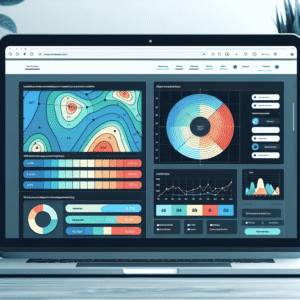
Heatmap plugins are revolutionary tools that transform how we comprehend user interactions. By offering a visual representation of data through color-coded maps, these plugins are essential for recognizing user engagement hotspots on websites.
User Interaction Insights
Identify which areas of your webpage engage users the most and which are being overlooked, providing crucial insights for optimizing website layout.
Enhanced User Experience
Tailor content and refine design effortlessly without extensive technical knowledge, ensuring vital information is not missed by visitors.
Informed Decision Making
Make informed decisions that enhance your website’s effectiveness by leveraging insights from user behavior tracking.
Boost Engagement
Drive measurable results and convert casual visitors into loyal customers by improving brand trust and user satisfaction.
Best WordPress Heatmap Plugins in 2025
In 2025, choosing the right heatmap plugin for your WordPress site involves considering both functionality and user needs. Below, we explore some of the top heatmap plugins available, helping you make an informed decision.
Crazy Egg
Provides robust tracking features including heatmaps, scrollmaps, and confetti reports that visually represent user interactions.
- Great for A/B Testing
- Alternative to Hotjar
Hotjar
Offers a comprehensive analysis tool with session recording, easy integration, and an intuitive dashboard.
- Popular choice historically
- Comprehensive analysis
Mouseflow
Excels in providing in-depth session replay and heatmap data to capture the whole journey of users on your site.
- Detailed user journey analysis
- Session replay feature
Lucky Orange
Known for its user-friendly interface, offering heatmaps, session recordings, and conversion funnels.
- Ideal for beginners
- User-friendly
Inspectlet
Advanced filtering capabilities that allow tracking of specific user segments and behaviors.
- Advanced filtering
- Tracks diverse user groups
Exploring Session Recording Options
Discover plugins that provide comprehensive insights into user journeys, further enhancing the benefits of heatmaps to offer strategic tracking solutions.
Hotjar Integration
Hotjar offers seamless WordPress integration for both heatmaps and session recordings, providing unmatched clarity on user journeys. Analyze real-time interactions to spot critical drop-offs such as those on checkout pages and optimize your site for better conversions.
Crazy Egg Insights
Crazy Egg excels in ease of use with its blend of heatmaps, scroll maps, and session recordings. Gain detailed insights to reveal user confusion points and tailor content for optimal conversions based on user engagement patterns.
Maximize Conversion Rates
Utilize session recording plugins to gain valuable insights into visitor behavior. Identify subtle bottlenecks, align content with user expectations, and employ these learnings to enhance your WordPress site’s conversion rates efficiently.
Balancing Tracking with Privacy
In the digital age where user data drives businesses, finding a balance between effective tracking and respecting user privacy is crucial. With tracking plugins on WordPress, site owners can gather invaluable insights into user behavior while maintaining a privacy-first approach.
Privacy-Focused Heatmaps
Utilize privacy-focused WordPress heatmap tools that anonymize user data for protected but actionable insights into visitor interactions.
User Consent Prioritization
Implement clear cookie consent notices to inform users about data practices and offer opt-in choices, fostering trust and compliance with GDPR and CCPA.
Regular Data Audits
Ensure data collection is limited to critical information for user experience improvement. Regularly delete outdated data to enhance user security.
By focusing on privacy, WordPress site owners can build trustful relationships. Engage your audience for feedback on privacy practices to improve user experience and stand out in a competitive digital landscape.
Enhancing Visuals with 3D Viewer Plugins
Introduce the potential of 3D viewer plugins for enriching user experience beyond tracking to enhance site aesthetics.
Transforming User Experience
In today’s digital landscape, creating a visually engaging website goes beyond just having well-written content and static images. Incorporating dynamic elements like 3D models can significantly elevate the user experience, making your site stand out and keep visitors engaged longer.
WordPress 3D viewer plugins offer a powerful toolset to achieve this by enabling site owners to integrate 3D models seamlessly, providing an interactive way for users to explore products, artworks, or designs.
Immersive Portfolios
One notable advantage is its ability to transform a portfolio. Artists and product designers can create a more immersive portfolio that resonates with potential clients, offering a nearly tangible sense of their work.
Enhanced Product Display
Imagine a virtual art gallery or a digital product showcase where users can interact directly with your designs, viewing them as they would in a real-world setting.
For example, an online furniture store could use a 3D viewer to let customers see every curve and texture of a piece before purchasing, enhancing aesthetic appeal and buyer confidence.
Captivating Audiences
As competition for user attention grows fiercer online, using a 3D viewer plugin may provide the unique edge a website needs to captivate audiences.
Explore MoreTop 3D Viewer Plugins for WordPress
Enhance your website with engaging 3D visuals using the most acclaimed plugins available in 2025.
3D Viewer Max
A versatile plugin praised for its intuitive interface and robust capabilities. Supports various 3D file formats and allows for easy customization, delivering an immersive experience.
Sketchfab’s 3D Plugin
Known for its seamless integration and dynamic model views, allowing users to embed and interact with 3D models directly on WordPress sites.
Visualizer 3D
A powerful free plugin offering real-time rendering, animation capabilities, and straightforward customization, ideal for both beginners and experienced developers.
Recommendations and Final Thoughts
User experience is paramount to maintaining an engaging and functional WordPress site. The right tools at your disposal can make all the difference. As explored, numerous “must have WordPress plugins for user experience” can transform user interaction on your site. Plugins like Yoast SEO enhance site visibility and user engagement through SEO optimization, while WPForms provides an easy way to create responsive and user-friendly forms, essential for feedback collection and boosting interaction.
For small businesses operating on a budget, several “free WordPress plugins for small business” offer invaluable functionalities without extra cost. WooCommerce enables robust e-commerce capabilities, effortlessly allowing small businesses to sell products. Meanwhile, Jetpack ensures site security, performance enhancement, and analytics without a premium package. These plugins enable businesses to maintain a competitive edge without financial overextension.
For beginners optimizing user interaction on WordPress sites, starting with essential plugins lays a solid foundation. Focus on core functionalities like improved load speed, enhanced security, and facilitated SEO. Once covered, branch out into plugins offering advanced analytics and personalized content recommendations for insights into user behavior and preferences.
In conclusion, continually revisiting and updating your plugins is crucial as the digital landscape evolves rapidly. By integrating the right plugins, site owners can boost user satisfaction and promote sustained growth and success online.
Browse Categories:
Tags for this post:
You may also like

Unlocking User Insights: Top WordPress Plugins for Heatmaps and User Tracking
Explore top WordPress plugins for heatmaps and user tracking to enhance site performance and optimize visitor engagement.
Top Free WordPress Plugins for Tracking User Clicks and Improving Conversions
Discover top free WordPress plugins to track user clicks and boost conversions effortlessly!

Top WordPress Plugins to Enhance User Interaction Tracking
Discover top WordPress plugins to track user interaction and boost your site's performance with our expert guide.